
How to Play Grapple Cart Obby
Every button we could observe, what it does, what it costs, and the grapple loop — read from the actual game UI on 2026-09-22 (mobile sessions in both English and Thai clients), with PC bindings credited to dated creator footage. Anything not verifiable is labeled Unknown instead of guessed.
Getting started: the lobby
You spawn in a lobby with labeled lane entrances — 1 PLAYER and 2 PLAYER — each over a colored launch pad, plus an Invite Friends! button for pulling a friend into your server. Creator footage (late September 2026) shows E also works as the interact key in the lobby on PC. Walking into a lane boards your cart and launches the run; there's no separate "start" button to hunt for.
One more thing worth knowing before your first launch: the course is split into stages that unlock in order, and cleared stages can be teleported to in later sessions (Sportskeeda's guide, modified 2026-09-28) — so an early death never erases your unlocked checkpoints, only your run progress.
Every observed button (mobile layout)
Top bar
- [R] Reset — Free resets your cart/position. The [R] hint is the PC keyboard binding.
- Repair Cart — 5 fixes your cart after damage.
- Skip Stage — 35 skips the current stage entirely.
Left rail
- Stages — opens the stage menu.
- Push — pushes another player's cart; the prompt appears on their cart and costs 4–7 coins.
- Explode — self-destruct button. We never witnessed the exact effect on video — treat it as "blows up your cart" and use with care.
Right side (mobile)
- Joystick — move (bottom left).
- BRAKE — round button, slows/stops the cart.
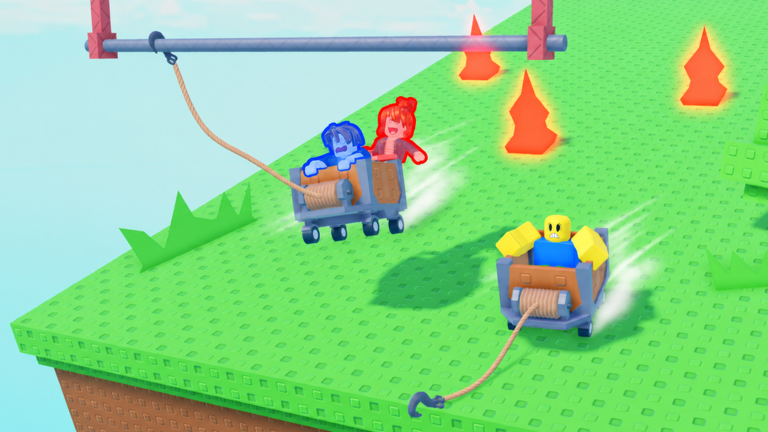
- Grapple hook — round button next to BRAKE; fires the cart's winch rope.
PC bindings (from creator footage)
Our own captures were mobile, but three late-September creator videos show the keyboard layout clearly. Per RoHorizon's October 2026 write-up of that footage: W/A/S/D to move, Spacebar to brake, and E to fire the grapple — OTTER ON ROBLOX's 2026-09-27 video narrates it directly: "If I press E, it grapples me forward." These are the creator videos' bindings as reported, dated 2026-09-25 to 2026-09-27; if the UI ever differs for you, the on-screen mobile buttons above are the ground truth we personally observed.
The grapple loop
The cart handles badly on purpose. Sportskeeda's beginner's guide (modified 2026-09-28) describes a cart that slides persistently after being pushed, slowing only gradually — momentum is the real enemy, not the gaps. The hook is your steering wheel as much as your bridge:
- Ride the track and line up with the next anchor point.
- Aim the winch rope (the cart's front winch is always mounted and ready).
- Fire the hook to pull or swing across the gap — then release and keep rolling.
- Chain hooks for speed: creators use the pull not just to cross but to correct a slide and build velocity for the next jump; release too early and you short-hop into the gap (Niz & Rex, 2026-09-25 video: "that wasn't enough power").
Captured sessions confirm using the hook to cross gaps; the official art set (icon + all three thumbnails) shows the winch-and-rope traversal.
Cart damage: one life, one repair window
Creator coverage describes the cart as the player's life — one life per run. Damage is real and visible: MelonBlox's 2026-09-27 video shows a cart missing wheels being pushed through stage four, still rolling but clearly crippled. The Repair Cart (5 coins) button exists for exactly this moment — fixing mid-run is cheaper than dying and restarting. If the cart gives out entirely, the death screen takes over (next section). We haven't observed a durability meter or damage thresholds on any screen — how many hits a cart takes is Unknown.
When you die
A YOU DIED screen appears with two choices: Revive (paid — observed at 4 coins with a 50%-off badge, and 7 coins in a later session) or Respawn (Free — back to the start). Coin-priced extras also appear there (5x boosts at 67 coins, heart upgrades at 59–105 coins observed). Because cleared stages teleport you forward between sessions, a free respawn costs you the current run, not your unlocks. When each option is worth it: Tips — death economy.
Honest limits
Explode button effect: never established from footage. How coins are earned: unknown — a "Wins" counter shows above avatars but the earn rule never appeared on screen. Durability rules: no meter observed. Stage count: six per Sportskeeda (2026-09-28), seven per creator footage (2026-09-27) — both listed on the home page until an official source settles it.
Next: survive longer and spend smart · play the shared cart with a friend.
FAQ
What are the PC controls?
W/A/S/D moves, Spacebar brakes, E fires the grapple (and interacts in the lobby) — credited to creator footage dated late September 2026.
Is Reset really free?
Yes — [R] Reset and Respawn are the two free recovery tools; everything else on the top bar costs coins.
Do I lose my stage unlocks when I die?
No. Cleared stages stay unlocked and can be teleported to in future sessions (Sportskeeda, 2026-09-28); dying only costs the current run's progress.
What does Explode do?
We never captured its exact effect — the label says self-destruct, so expect to lose the cart. That's the honest answer until we see it used.